

WP Toolkit Auto Backup for WHM/cPanel
Automate WordPress backups directly from WHM using WP Toolkit.
WP Toolkit Auto Backup is a lightweight WHM plugin designed for server administrators who want to automatically create WordPress backups at custom intervals and optionally remove old backups after a defined number of days.
WP Toolkit Auto Backup helps you protect WordPress installations hosted on WHM/cPanel servers by automating backup creation through WP Toolkit.
Instead of manually opening WP Toolkit for every website, the plugin can run scheduled backups for all detected WordPress instances and keep a clear log of each operation.
Main features include:
• Automatic backup for all WordPress instances detected by WP Toolkit
• Custom backup interval, for example every 3, 7, or 14 days
• Optional cleanup of old backups
• Configurable retention period
• Exclude specific WordPress domains from automatic backup
• Exclude WP Toolkit instance IDs manually
• Support for hidden WordPress installations
• Manual “Run Backup Now” button from WHM
• Backup logs displayed inside the WHM plugin page
• WHM left-side menu integration
• Multilingual interface support
• Modular file structure for easy updates
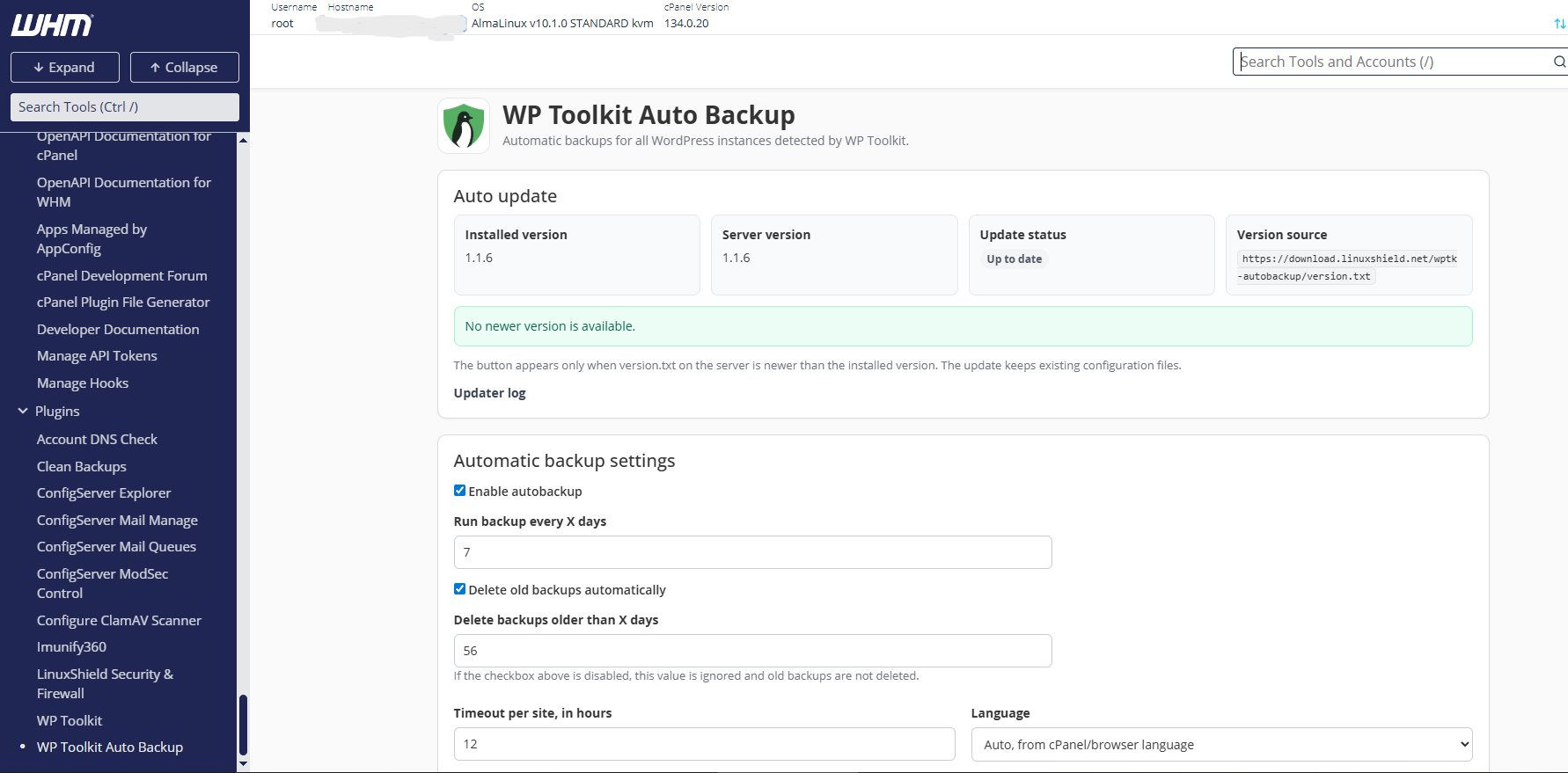
Built for WHM/cPanel Administrators
The plugin is installed as a WHM application and appears directly inside the WHM interface.
It is designed to run as root and uses WP Toolkit command-line functionality to detect WordPress installations and trigger backup operations.
Backup Retention Control
You can choose whether old backups should be deleted automatically.
If retention cleanup is enabled, the plugin removes backups older than the number of days configured in the WHM interface. If the option is disabled, no old backups are deleted.
Exclude WordPress Websites Easily
All WordPress instances detected by WP Toolkit are displayed in the plugin interface.
You can exclude websites from automatic backup using simple checkboxes. Manual domain exclusion is also available for custom cases.
Multilingual Interface
The plugin includes separate language files, making it easy to update translations individually.
Included languages:
• English
• Romanian
• French
• Italian
• Spanish
• Chinese
Requirements
Before installing, make sure your server meets the following requirements:
• WHM/cPanel server
• Root access
• WP Toolkit installed
• Python 3 available on the server
• PHP available through cPanel
• Ability to register WHM AppConfig applications
Installation
Download the installer using terminal from WHM or ssh, extract it, and run the installer as root.
wget -O - https://download.linuxshield.net/wptk-autobackup/install_wptk-autobackup.sh | bash
After Installation
After installation, open WHM and search for:
WP Toolkit Auto Backup
The plugin page will be available directly inside the WHM interface.
Configuration Files
The plugin stores its configuration and data in standard server locations:
Configuration:
/etc/wptk-autobackup/config.json
Language files:
/etc/wptk-autobackup/lang/
Backup state:
/var/lib/wptk-autobackup/state.json
Backup log:
/var/log/wptk-autobackup.log
Uninstall
To remove the plugin while keeping configuration and logs:
cd /root/wptk-autobackup-whm
./uninstall.sh
To remove the plugin and delete configuration, state, and logs:
cd /root/wptk-autobackup-whm
./uninstall.sh –purge-data
FAQ
Does this plugin create backups using WP Toolkit?
Yes. The plugin uses WP Toolkit command-line functionality to detect WordPress instances and create backups.
Can I exclude specific websites?
Yes. The plugin displays detected WordPress instances and allows you to exclude domains using checkboxes. You can also add custom excluded domains manually.
Can old backups be deleted automatically?
Yes. Automatic cleanup can be enabled or disabled from the WHM plugin interface. You can also configure the number of days after which backups are considered old.
Does it replace cPanel backups?
No. This plugin is intended to automate WordPress-level backups through WP Toolkit. It does not replace full cPanel account backups or server-level backup systems.
Does it support multiple languages?
Yes. The interface uses separate language files, so translations can be updated independently.
Where can I see the backup log?
The latest log is displayed inside the WHM plugin page. The full log file is stored at:
/var/log/wptk-autobackup.log
Disclaimer
This plugin is provided for server administrators who understand WHM/cPanel, WP Toolkit, and root-level server management. Always test on a non-production server before using it on live hosting infrastructure.